 RemoteOpsGet started
 ACCESS POLICIES
Browser history and classification
Collection, identity selection, refreshes, keyword classification and clearing.
Examples use remoteops.example.com and fictional systems. Adapt them to your tenant.
Screen reference#
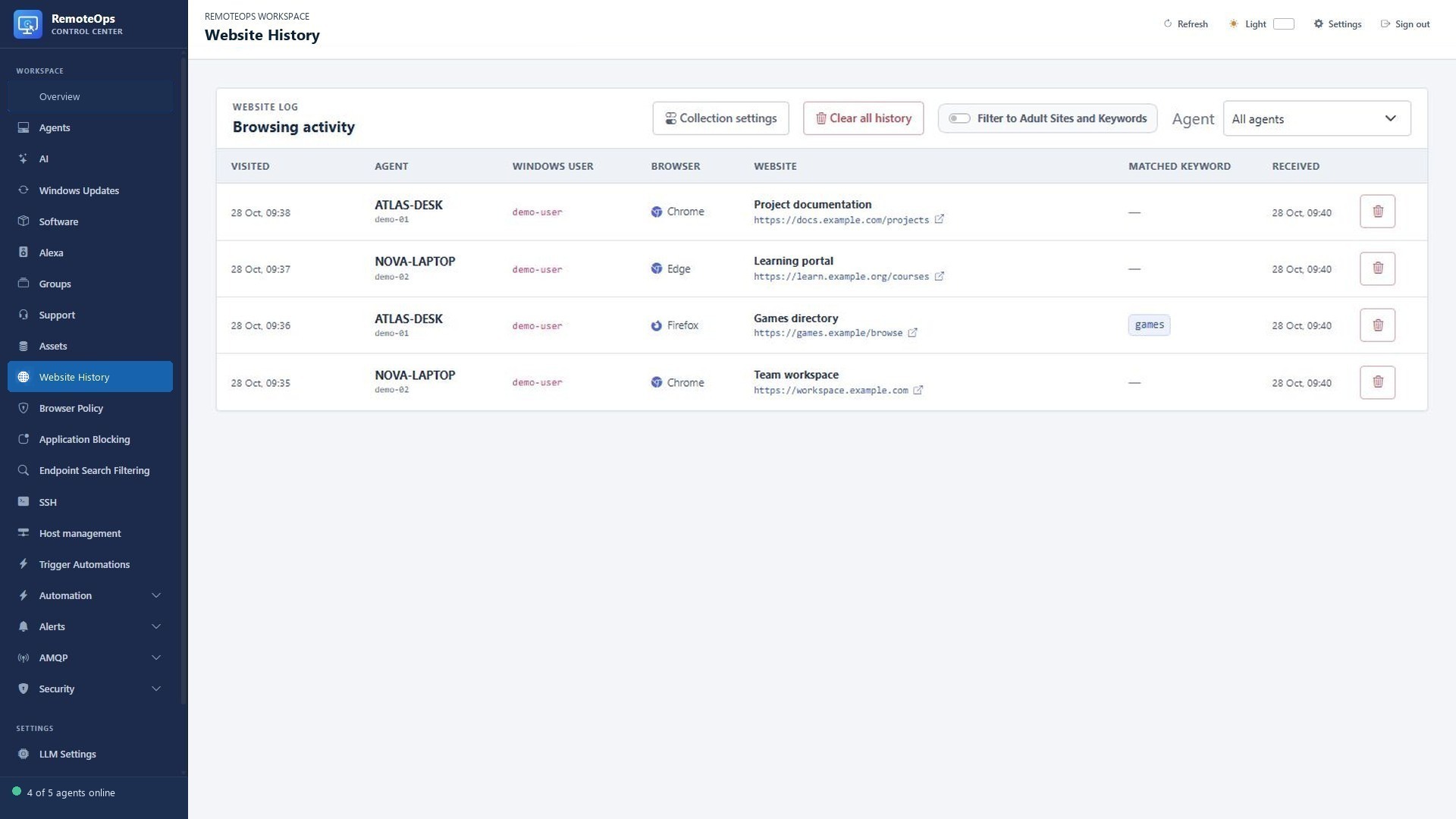
Review device/user, browser, title, URL and visit time together. Collection controls request or clear history. A matching page record is evidence of saved browser history, not evidence of all traffic or incognito activity.
Collection is opt-in#
Enable history collection only for the devices you intend to inspect. Browsing history and access enforcement are independent. A device can collect without blocking, block without collecting, or use both features.
Website History is a navigation heading with separate pages:
| Page | Purpose |
|---|---|
| Website Visitation | Enable collection per agent, inspect collection status, refresh history, and clear selected agents' stored visits |
| Website Logs | Browse visits, inspect Matched Keyword, filter by agent or keywords, and Clear all history for every agent |
| URL Exemptions | Add/edit/delete case-insensitive regular expressions that exclude matching URLs from keyword classification |
| Access Control | Enable/disable blocking per agent and configure global rules, additional agent rules, and exceptions |
Collection and blocking are independent. Enabling collection does not block sites; the Access Control Enable/Disable action changes enforcement, retaining the agent's lists while disabled. Configure or clicking an agent opens its additional blocked patterns and exceptions.
Collection and refresh
- Collection is disabled by default. The agent reads HTTP/HTTPS visits from Chrome, Edge, and Firefox history for one signed-in Windows user, not from packet capture or private/incognito tabs.
- The active console user is preferred; otherwise an active remote Windows session or one unambiguous disconnected signed-in account is used. The user's SID resolves the actual profile path. Missing or ambiguous users produce a reported error rather than a successful empty collection.
- Each collection returns up to the newest 500 entries across supported profiles, limited to visits from the last 30 days. This is a bounded recent-history view, not a complete browsing audit. The portal displays up to the newest 5,000 stored entries across agents.
- Successful collection normally repeats daily. Refresh requests another collection; Refresh online agents targets only online agents with collection enabled and no refresh already pending. AMQP signals wake connected agents promptly; normal heartbeat polling remains a fallback. Browser writes and agent availability can delay new rows.
- A failed manually requested refresh remains pending and is retried after approximately 30 seconds. Ordinary collection failures retry after 15 minutes. The portal shows the collection error; it does not silently treat the error as an empty result.
- Chrome can retain an exclusive SQLite lock while it is running. The agent first attempts a normal read, then uses a private temporary database copy including its WAL/rollback journal. It checks source bytes for changes, validates the copy, and retries on detected changes. The fallback is bounded to 256 MiB and 15 seconds per attempt, with up to three fallback attempts. It does not close Chrome, disable live database locking, or modify browser history; temporary working files are removed after use.
- Refresh cannot recover visits not saved by the browser. Individual deletions remain deleted; clearing an agent records a cutoff so older visits are not imported again. Clear all history affects every agent even when the table is filtered. These actions remove portal history, not the browser's local history.
Last upload is the count submitted by the latest collection, not the count of newly inserted rows. Duplicates and previously cleared visits can therefore produce a nonzero upload count with no new visible rows. If a visit is missing, check the selected Windows user, collection status/error, visit time versus the clear cutoff, and current table filters.
Keyword filtering versus blocking
Filter to Adult Sites and Keywords shows only URLs with a nonempty Matched Keyword result. Edit keywords using Collection settings on Website Logs. URL Exemptions accepts expressions without regex delimiters (maximum 500 entries, 512 characters each); a matching exemption suppresses keyword matching for that URL. Default exemptions cover YouTube Shorts and Google Accounts URLs. This is text classification, not a definitive adult-content verdict.
Exemptions do not delete visits and do not allow websites through Access Control. Blocking uses browser policy patterns, not these regexes: global and per-agent lists are combined, and allow exceptions take precedence over blocks. To block only a path, put that path in the blocked list; a broad allow exception for the entire domain can override it.
The agent writes managed URL block/allow policies for Chrome, Edge, and Firefox. The browser supplies its blocked-page message; this is not a network-wide firewall or a custom interception page. Policy changes can close running supported browsers so the new rules take effect. Chrome/Edge are relaunched with session restoration; Firefox may need reopening. A browser that refuses to close produces an application error. This policy refresh is separate from history collection, which never closes the browser.
The agent reports a SHA-256 policy hash so unchanged rule arrays are not repeatedly transferred. Check Last applied and any policy error after saving; Enforcing is reported policy status, not proof that every open browser tab has been independently tested.
Review a specific device#
Select the device in Website Visitation, check collection status and the selected Windows user, and request a refresh if needed. Open Website Logs and filter by the same device. Check the visit timestamp, not just receipt time. Use Matched Keyword as a text-classification aid, not an independent verification of page content.
Useful diagnostics#
If a visit is missing, check that the browser saved it, the selected profile belongs to the expected signed-in account, and the visit is inside the collection time range and after any clear cutoff. Confirm that active table filters are not hiding it. A nonzero last-upload count may contain duplicate or already-cleared visits and therefore yield no new visible row.