 RemoteOpsGet started
 AI ADMINISTRATION
Example: camera images to an AI storm check
Capture an image, send it to a vision model and review an illustrative stormy-scene result.
Examples use remoteops.example.com and fictional systems. Adapt them to your tenant.
What this example demonstrates#
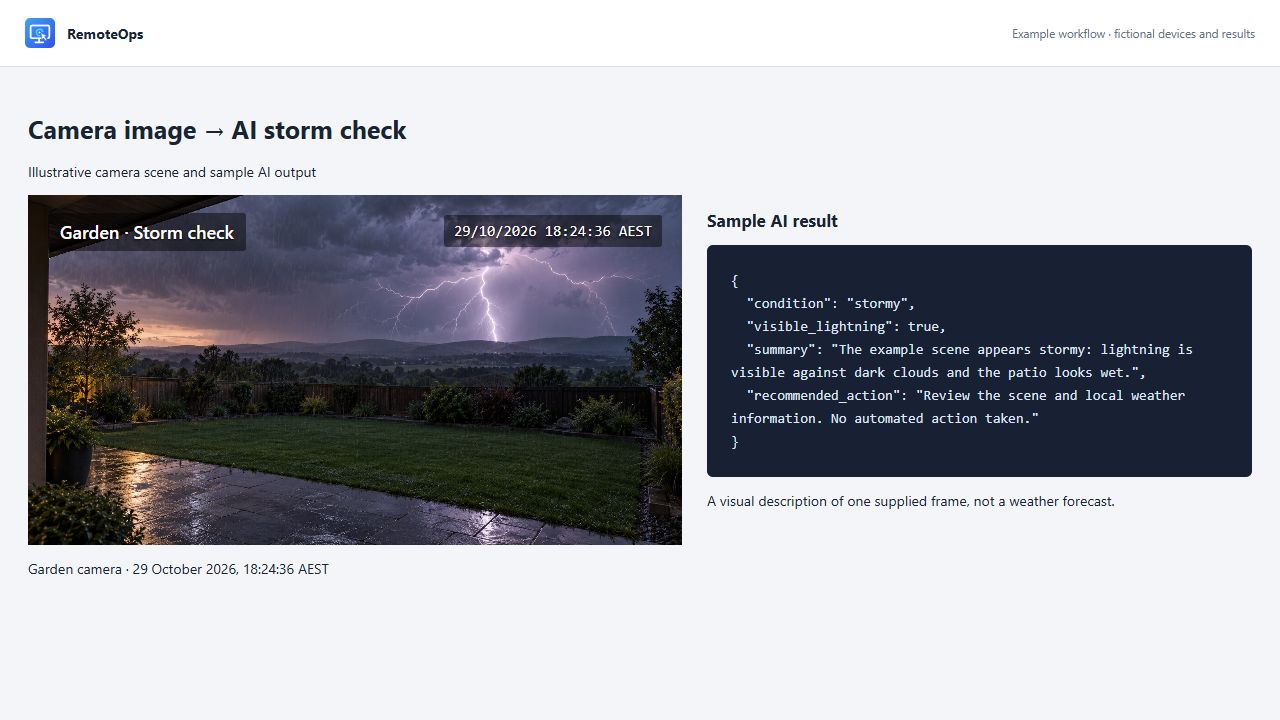
Capture a camera frame, pass its image output to an image-capable model connection, and ask the model to describe visible weather cues. This example uses a generated Garden camera scene with lightning, a fixed date/time overlay and sample AI output. It does not use a customer video feed or results from a live model run.
The camera label and time are part of the illustrated feed. They are not metadata added by the capture task. A model describing a supplied frame is not a weather forecast or an alert service.
Prerequisites#
Use an authorised test camera reachable from the Orchestrator, and configure an image-capable model connection. The recipe calls that connection vision_demo; create it or replace the name. The example addresses below are placeholders and do not provide a working stream.
capture-rtsp-frame runs on the Orchestrator. It returns a JPEG data URL, capture timestamp, transport and byte count. It does not display a live desktop window. Use rtsps_stream separately when a person should watch a timed stream.
Complete capture and analysis package#
- timeout: 300
- task: capture-rtsp-frame
  name: garden_frame
  continue_on_error: false
  inputs:
    url: 'rtsps://camera.example.com:7441/garden?enableSrtp'
    timeout_seconds: 20
- task: llm
  name: storm_check
  continue_on_error: false
  inputs:
    connection: vision_demo
    format: json
    prompt: |
      Describe only the visible weather cues in the supplied camera image.
      Return a JSON object with condition, visible_lightning, summary,
      and recommended_action. condition must be stormy, clear, or uncertain.
      Set visible_lightning true only when lightning is actually visible.
      If the view is ambiguous or unusable, use uncertain and explain why.
      Do not infer a forecast, the time of the next strike, or whether an
      outdoor activity is safe. Do not initiate any action.
    images:
      - '=garden_frame.image'
The important hand-off is images: ['=garden_frame.image']. Pass the capture output, not a local file path or a stream URL, into the model's image input. Set continue_on_error: false on capture so the model is not asked to analyse a missing image.
format: json requests a JSON response and exposes parsed JSON in the task's json output. It does not enforce the application-specific schema above: validate the returned fields before using them in later decisions. The task also provides its textual response in text.
Sample AI result#
{
  "condition": "stormy",
  "visible_lightning": true,
  "summary": "The example scene appears stormy: lightning is visible against dark clouds and the patio looks wet.",
  "recommended_action": "Review the scene and local weather information. No automated action taken."
}
This is a deliberately written example result for the fictional image. A real model may describe the same image differently. stormy is the example's label for visible cues, not a verified observation from a weather station.
| Field | How to read it |
|---|---|
condition |
Requested scene label: stormy, clear or uncertain |
visible_lightning |
Model assessment of the supplied pixels, not a lightning detector measurement |
summary |
Explanation of the visible cues |
recommended_action |
Informational text for operator review; not an automatic command |
Optionally show the summary to an operator#
Append these tasks to the recipe above. The coordinator parses the model text, checks the expected fields and formats a short message. The notification is displayed on the explicitly selected Windows agent.
- task: inline_powershell
  name: prepare_weather_notice
  continue_on_error: false
  inputs:
    model_text: '=storm_check.text'
    script: |
      $report = $model_text | ConvertFrom-Json -ErrorAction Stop
      if ($report.condition -notin @('stormy', 'clear', 'uncertain') -or
          $report.visible_lightning -isnot [bool] -or
          $report.summary -isnot [string] -or
          $report.summary.Length -gt 1500) {
          throw 'The storm-check result did not match the expected shape.'
      }
      return @{
          message = "Garden camera: $($report.condition). $($report.summary)"
      }
- task: notification
  name: show_weather_summary
  agent: 'ATLAS-DESK'
  type: large
  message: '=prepare_weather_notice.message'
  continue_on_error: false
This requires a logged-in interactive user on ATLAS-DESK. It presents the summary; it does not shut down devices, unlock a door or control physical equipment. Inspect Job History to verify capture, model response and notification outcomes separately.
Compare images from two cameras#
Capture each source in its own named task, then supply both image outputs. This fragment assumes the two capture tasks have already succeeded:
- task: llm
  name: compare_views
  continue_on_error: false
  inputs:
    connection: vision_demo
    prompt: |
      Image 1 is the Garden camera and image 2 is the Driveway camera.
      Describe visible weather cues in each view separately.
      Report uncertainty; do not infer a forecast or initiate an action.
    images:
      - '=garden_frame.image'
      - '=driveway_frame.image'
The images input supports one to four images within the product's input-size limits. Do not also set image on the same task. Separate captures have separate timestamps and need not represent exactly the same instant.
Review and troubleshooting#
- Verify the capture timestamp and image before trusting the model's description.
- Check the Orchestrator's route to the test camera if capture fails.
- Use a connection that supports image input; a text-only model cannot inspect the frame.
- Review the prompt, response and task errors in Job History, without sharing camera credentials or encoded image data in public logs.
- Treat glare, compression, reflections and poor exposure as possible ambiguity rather than evidence of a specific event.
- Use independent weather information and a person for operational decisions; this example only demonstrates image input and result handling.
See Camera streams, AI administration, Model connections and the LLM task contract.