 RemoteOpsGet started
 MANAGE DEVICES
Devices, groups and inventory
Enrollment, presence, grouping, tags, assets and administrative actions.
Examples use remoteops.example.com and fictional systems. Adapt them to your tenant.
Screen reference#
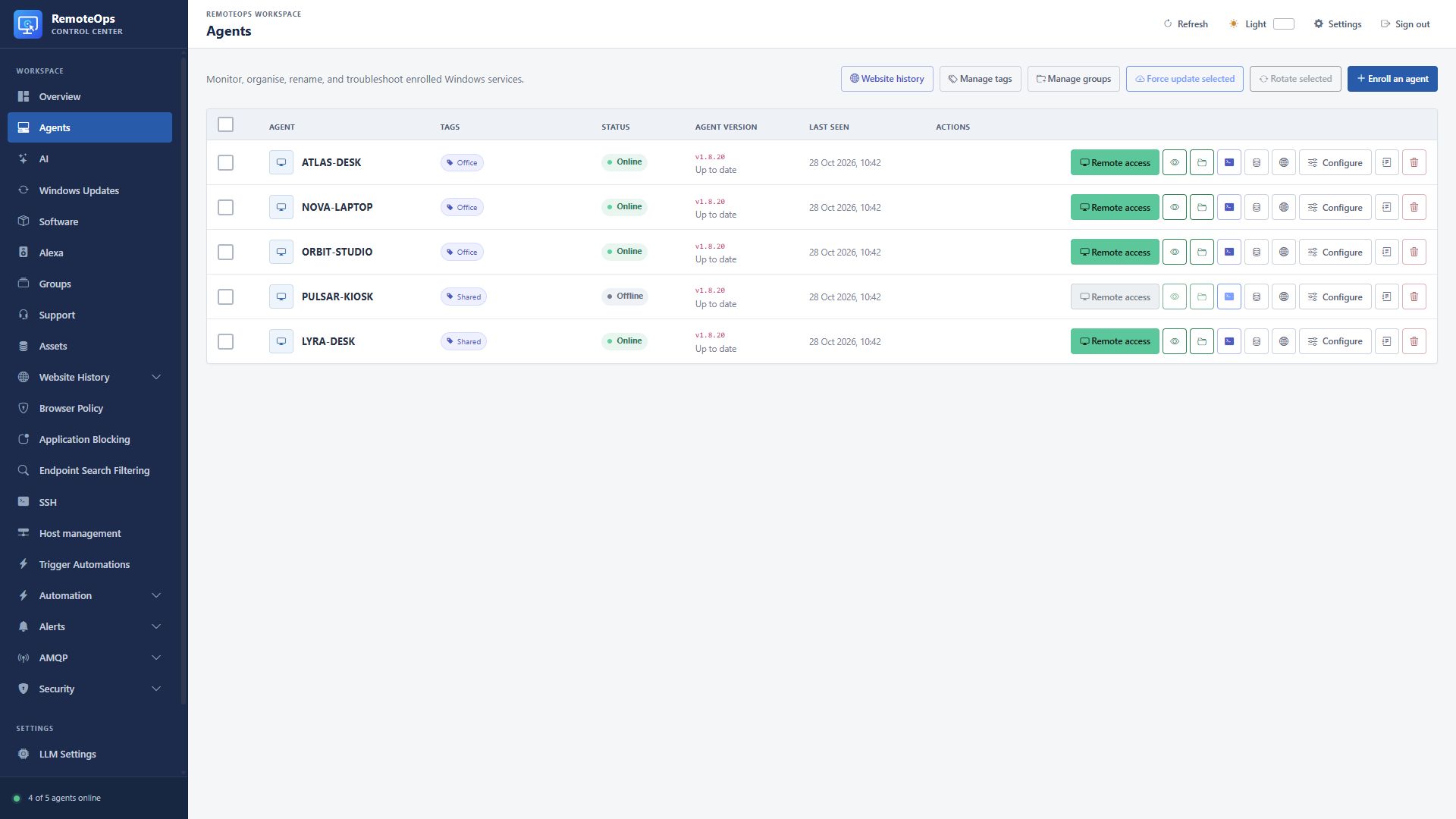
Agent identifies the computer. Tags provide labels. Status shows online, offline or a pending operation. Agent version compares the reported version with the available release. Last seen is the last contact. Actions open desktop, view-only, files, PowerShell, inventory, history, settings or logs.
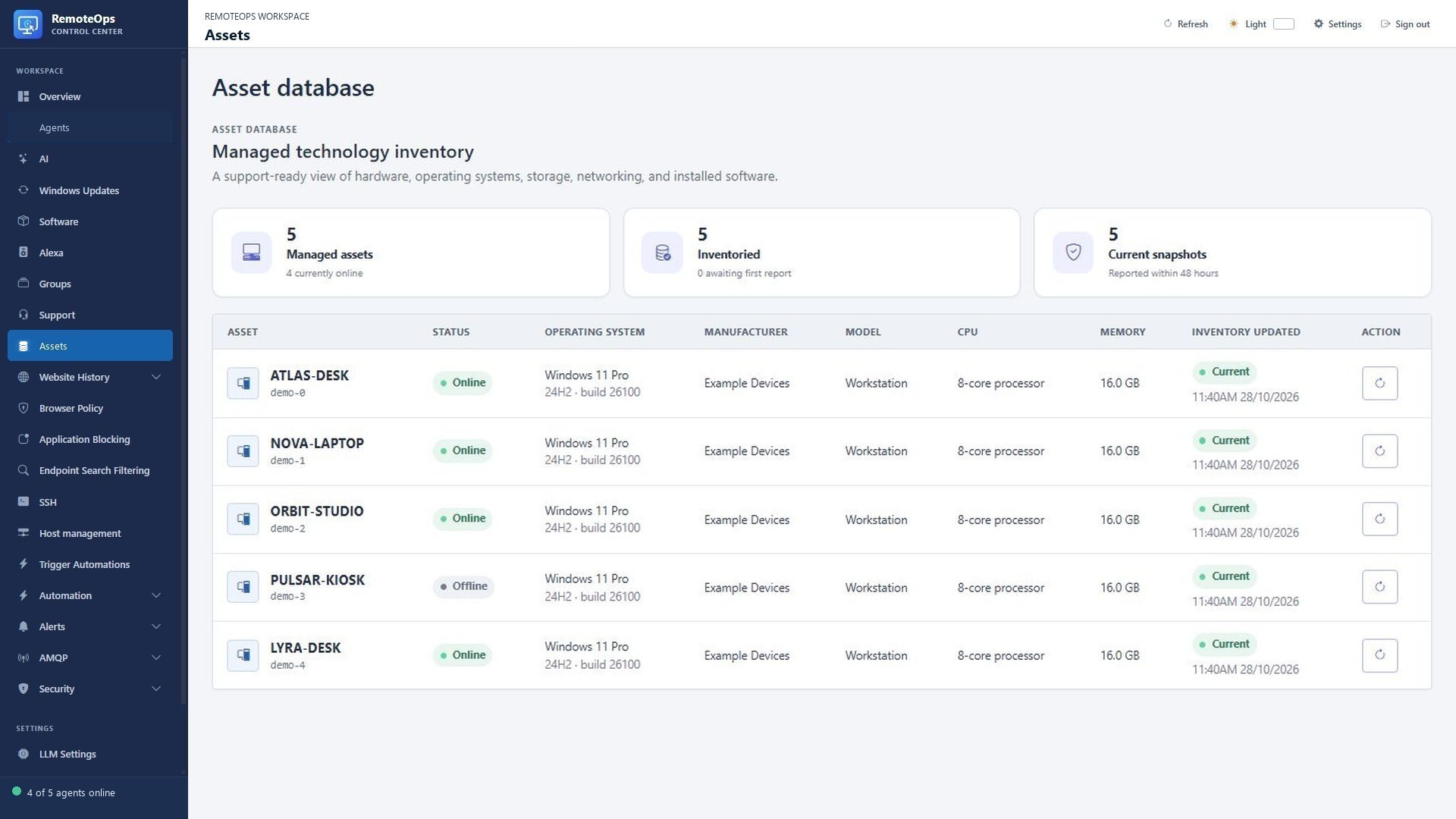
Operating system includes the reported version/build. Manufacturer, Model, CPU and Memory describe the last inventory snapshot. Inventory updated reports its timestamp and freshness. The refresh action requests a new collection; it does not make old inventory current immediately.
Organise the fleet#
The Agents view shows device identity, presence, main/recovery versions, model and last-seen information. Display names help people identify targets; groups apply shared policies; tags provide another way to find related devices. Use distinct names when workflows target a device by display name.
- Six-character hexadecimal one-time, one-week, and permanent usage-limited enrollment codes
- Permanent per-agent runtime and recovery credentials
- Safe runtime credential rotation with pending-token confirmation
- Online/offline status, agent and recovery versions, system model, and last-seen times
- Agent display names, groups, multi-select tags, and bulk actions
- Per-agent diagnostic logging that is uploaded only while debug mode is enabled
- Opt-in per-agent browser-history collection, online-agent refresh, and durable individual, selected-agent, and all-agent clearing
- Separate website blocking with global/per-agent rules and exceptions
- Storage volume labels and online-only drive/computer rename commands; computer renames require a Windows restart
- Remote and local uninstall handling with server-side credential revocation fallback
- Force update from an agent's Configure dialog or as a bulk action
Enrollment and identity#
Enrollment codes are short bootstrap credentials. Runtime and recovery credentials are separate permanent per-device credentials established during enrollment. A code expiring does not automatically revoke an already enrolled agent. Revoke credentials or uninstall/remove the device when access must end.
Groups, policy inheritance and overrides#
Assigning a device to a group switches inherited group policy and exclusions. Explicit device overrides remain in effect. Ungrouped devices use the No group policy where supported. Review overrides during moves between groups so a previously configured exception is not mistaken for a new group's default.
Inventory and freshness#
Use the Assets view for hardware, software, disks and network data. Inspect the collection time before relying on an old value. A refresh request is an operation sent to a device, not an immediate reading from an offline machine. Storage labels and computer rename commands are separate actions; a computer rename requires a Windows restart.
Bulk operations#
Use filtering, sorting and selection to target devices. Where Select all filtered is available, it selects matching rows across pages. A selection can include devices hidden by a later filter change. Check the selection count and per-device results. An accepted request is not a successful completed change on every endpoint.
Diagnostics#
Enable debug logging for the device being investigated, reproduce the problem, inspect the uploaded logs, then disable debug collection when finished. Diagnostic upload occurs only while the device's debug mode is enabled. See Jobs and troubleshooting for result interpretation and cancellation.